iMac Pro, The Most Powerful Mac Ever

Apple today released iMac Pro, an entirely new product line designed for pro users who love the all-in-one design of iMac and require workstation-class performance. With Xeon processors up to 18 cores, up to 22 Teraflops of graphics performance, and a brilliant 27-inch Retina 5K display, iMac Pro is the fastest, most powerful Mac ever made. iMac Pro delivers incredible compute power for real-time 3D rendering, immersive VR, intensive developer workflows, high megapixel photography, complex simulations, massive audio projects and real-time 4K and 8K video editing.

“iMac Pro combines the incredible design of the iMac with the most powerful workstation architecture we’ve ever built,” said John Ternus, Apple’s vice president of Hardware Engineering. “iMac is the most popular desktop for our pro users due to its amazing display and elegant design, so we completely re-engineered it to deliver performance far beyond what anyone thought possible in an all-in-one.”

Read the entire news release, complete with images  > HERE.

Apple Reveals 2017’s Most Popular Apps

Apple has unveiled its 2017 charts and trends, celebrating the most popular apps, music, movies, TV shows, books and podcasts across the App Store, Apple Music, iTunes, iBooks and Apple Podcasts.

Editors and curators from Apple Music, App Store and iTunes highlight great content from indie artists and developers from around the globe.

App Store editors identify four breakout trends in app culture for 2017: the introduction of AR (augmented reality) apps and games, the rise of real-time competitive gaming, apps focused on mental health and mindfulness and apps transforming storytelling and reading.

Editorial App and Game of the Year Selections
2017 iPhone App of the Year: Calm
2017 iPhone Game of the Year: Splitter Critters
2017 iPad App of the Year: Affinity Photo
2017 iPad Game of the Year: The Witness

The top movie of the year was “Moana”, followed by “Rogue One: A Star Wars Story” and “Wonder Woman”. iTunes is leading the charge toward 4K HDR content, with most of the top charting movies already available in 4K HDR as well as classics and holiday favorites like the Harry Potter series, “Home Alone”, “Office Christmas Party” and “Dr. Seuss’ How the Grinch Stole Christmas”.

Read the entire News Release.
View the Top Apps Charts.
View the Top Games Charts.

Apple Reports Fourth Quarter Results

Apple today announced financial results for its fiscal 2017 fourth quarter ended September 30, 2017. The Company posted quarterly revenue of $52.6 billion, an increase of 12 percent from the year-ago quarter, and quarterly earnings per diluted share of $2.07, up 24 percent. International sales accounted for 62 percent of the quarter’s revenue.

“We’re happy to report a very strong finish to a great fiscal 2017, with record fourth quarter revenue, year-over-year growth for all our product categories, and our best quarter ever for Services,” said Tim Cook, Apple’s CEO. “With fantastic new products including iPhone 8 and iPhone 8 Plus, Apple Watch Series 3, and Apple TV 4K joining our product lineup, we’re looking forward to a great holiday season, and with the launch of iPhone X getting underway right now, we couldn’t be more excited as we begin to deliver our vision for the future with this stunning device.

“Apple’s year-over-year revenue growth rate accelerated for the fourth consecutive quarter and drove EPS growth of 24 percent in the September quarter,” said Luca Maestri, Apple’s CFO. “We also generated strong operating cash flow of $15.7 billion and returned $11 billion to investors through our capital return program.”

Apple is providing the following guidance for its fiscal 2018 first quarter:
  • revenue between $84 billion and $87 billion
  • gross margin between 38 percent and 38.5 percent
  • operating expenses between $7.65 billion and $7.75 billion
  • other income/(expense) of $600 million
  • tax rate of 25.5 percent

Apple’s board of directors has declared a cash dividend of $0.63 per share of the Company’s common stock. The dividend is payable on November 16, 2017 to shareholders of record as of the close of business on November 13, 2017.

Read the entire news release  > HERE.

iPhone X Available For Pre-order On Friday

iPhone X, the future of the smartphone, featuring a revolutionary new design with a stunning all-screen display, wireless charging and an incredible rear camera with dual optical image stabilization, will be available to customers for pre-order on Friday, October 27, at 12:01AM PDT on apple.com and the Apple Store app.

iPhone X will be available in more than 55 countries and territories, and in Apple Stores beginning Friday, November 3 at 8:00AM local time. Stores will have iPhone X available for walk-in customers, who are encouraged to arrive early.

iPhone X features a gorgeous all-glass and stainless steel design with a beautiful 5.8-inch Super Retina display, A11 Bionic chip with neural engine for powerful machine learning, augmented reality and immersive 3D gaming experiences, wireless charging and Face ID, delivering an innovative and secure new way to unlock, authenticate and pay.

The TrueDepth camera that enables Face ID brings Portrait mode with Portrait Lighting to the front camera for beautiful selfies with a depth-of-field effect and enables Animoji, which captures and analyzes over 50 different facial muscle movements to bring emoji to life in a fun new way.

A redesigned rear camera with dual optical image stabilization includes a new color filter, deeper pixels, an improved Apple-designed image signal processor and features Portrait mode with Portrait Lighting allowing customers to capture stunning photos and videos.

The all-glass front and back on iPhone X feature the most durable glass ever in a smartphone in two beautiful finishes, silver and space gray.

Read about pricing and availability  > HERE.

macOS High Sierra -- Free Update

Apple today announced macOS High Sierra, the latest release of the world’s most advanced desktop operating system, is now available as a free update.

With macOS High Sierra, Mac users gain powerful new core storage, video and graphics technologies. A new file system ensures more efficient and reliable storage, and support for High-Efficiency Video Coding (HEVC) brings stunning 4K video at lower file sizes. Metal 2 powers virtual reality content creation, faster performance and more. The Core ML developer framework makes it easy to create apps with powerful machine learning that predict, learn and become more intelligent. macOS High Sierra also includes a number of refinements to the apps Mac users enjoy everyday, including Photos and Safari.

“macOS High Sierra is an important update that makes the Mac more capable and responsive, while laying the foundation for future innovations,” said Craig Federighi, Apple’s senior vice president of Software Engineering. “High Sierra introduces new technologies for VR, high-efficiency video streaming, advances in storage technology and more, while apps such as Photos, Safari, Mail and Notes are refined to give users even more reasons to love their Mac.”

Read the entire news release, complete with images  > HERE.

iOS 11 Is Available Tomorrow

Starting Tuesday, 9-19, iPhone and iPad customers around the world will be able to update their devices to iOS 11, a major update to the world’s most advanced mobile operating system and the biggest software release ever for iPad. iOS 11 brings augmented reality to hundreds of millions of iOS devices and new professional capabilities improve images in Photos and Camera. Siri is more natural and useful and a redesigned App Store makes it easier to discover apps and games.

iPad Becomes Even More Powerful

The all-new Dock provides quick access to favorite and frequently used apps and documents from any screen and makes it easier to work with multiple apps with Split View and now Slide Over. Drag and Drop makes moving images, text and files between apps easier than ever using Multi-Touch. And Apple Pencil is more deeply integrated into iPad Pro with support for inline drawing and a new Instant Notes feature that opens Notes from the Lock Screen by simply tapping Apple Pencil on the display.

The all-new Files app provides a central place to access and organize files no matter where they are located - on iPad or in the cloud with built-in support for iCloud Drive as well as providers, such as Box, Dropbox and others.

Read the entire news release, complete with images  > HERE.

Apple Watch Series 3

Brings built-in cellular, powerful new health & fitness enhancements
Featuring Streaming Music, Faster Dual-Core Processor and watchOS 4

On Tuesday, 9-12, Apple introduced Apple Watch Series 3, adding built-in cellular to the world’s number one watch. Whether users are out for a run, at the pool or just trying to be more active throughout their day, Apple Watch Series 3 with cellular allows them to stay connected, make calls, receive texts and more, even without iPhone nearby. The third-generation Apple Watch is an amazing health and fitness companion with intelligent coaching features, water resistance 50 meters1 and a new barometric altimeter that measures relative elevation. Apple Watch Series 3 comes in two models, one with GPS and cellular, and one with GPS, both featuring a 70 percent faster dual-core processor and new wireless chip.

“We believe the addition of cellular will transform the way people use Apple Watch, providing a new sense of freedom since they can stay connected with or without their iPhone,” said Jeff Williams, Apple’s chief operating officer. “Apple Watch Series 3 combined with the power of watchOS 4 is the ultimate device for a healthy life.”

Soon, the combination of cellular and watchOS 4 will allow Apple Music users to stream 40 million songs right from their wrist. Beginning Friday, September 15, Apple Watch Series 3 (GPS + Cellular) will be available to order in 10 countries and territories, and Apple Watch Series 3 (GPS) will be available to order in 28 countries and territories. Both models are available in stores starting Friday, September 22.

Read the entire news release, complete with images  > HERE.

The future is here: iPhone X

Packed with Innovative Features Including a Super Retina Display,
TrueDepth Camera System, Face ID and A11 Bionic Chip with Neural Engine

Apple yesterday announced iPhone X, the future of the smartphone, in a gorgeous all-glass design with a beautiful 5.8-inch Super Retina display, A11 Bionic chip, wireless charging and an improved rear camera with dual optical image stabilization. iPhone X delivers an innovative and secure new way for customers to unlock, authenticate and pay using Face ID, enabled by the new TrueDepth camera. iPhone X will be available for pre-order beginning Friday, October 27 in more than 55 countries and territories, and in stores beginning Friday, November 3.

“For more than a decade, our intention has been to create an iPhone that is all display. The iPhone X is the realization of that vision,” said Jony Ive, Apple’s chief design officer. “With the introduction of iPhone ten years ago, we revolutionized the mobile phone with Multi-Touch. iPhone X marks a new era for iPhone - one in which the device disappears into the experience.”

“iPhone X is the future of the smartphone. It is packed with incredible new technologies, like the innovative TrueDepth camera system, beautiful Super Retina display and super fast A11 Bionic chip with neural engine," said Philip Schiller, Apple’s senior vice president of Worldwide Marketing. “iPhone X enables fluid new user experiences - from unlocking your iPhone with Face ID, to playing immersive AR games, to sharing Animoji in Messages - it is the beginning of the next ten years for iPhone.”

Read the entire news release, complete with images  > HERE.

Apple Announces iPhone 8, iPhone 8 Plus:

A new generation of iPhone
Featuring New Glass and Aluminum Design, Retina HD Displays, A11
Bionic Chip, New Single and Dual Cameras with Support for Portrait
Lighting, Wireless Charging and Optimized for Augmented Reality

Apple today announced a new generation of iPhone: iPhone 8 and iPhone 8 Plus. The new iPhone features a new glass and aluminum design in three beautiful colors made out of the most durable glass ever in a smartphone, Retina HD displays and A11 Bionic chip, and is designed for the ultimate augmented reality experience. The world’s most popular camera gets even better with single and dual cameras featuring Portrait Lighting on iPhone 8 Plus, and wireless charging brings a powerful new capability to iPhone. Both devices will be available for pre-order beginning Friday, September 15, in more than 25 countries and territories, and in stores beginning Friday, September 22.

“iPhone 8 and iPhone 8 Plus are a new generation of iPhone that improve on everything we love about iPhone,” said Philip Schiller, Apple’s senior vice president of Worldwide Marketing. “iPhone 8 and iPhone 8 Plus have new glass and aluminum designs, new Retina HD displays and A11 Bionic - the smartest chip ever in a smartphone. Packed with more advanced cameras with Portrait mode and Portrait Lighting, and the highest quality video capture in a smartphone, iPhone 8 and iPhone 8 Plus enable the freedom of wireless charging, all with AR optimization like no phone ever before.”

Read the entire news release, complete with images  > HERE.

Apple To Build New Data Center In Iowa

Apple today announced plans to build a 400,000-square-foot, state-of-the-art data center in Waukee, Iowa, to better serve North American users of iMessage, Siri, the App Store and other Apple services. Like all Apple data centers, the new facility will run entirely on renewable energy from day one.

Apple’s investment of $1.3 billion will create over 550 construction and operations jobs in the Des Moines area, and the company is contributing up to $100 million to a newly created Public Improvement Fund dedicated to community development and infrastructure around Waukee.

Read the complete news release > HERE.

Apple Keeps iPod Touch, Kills Nano, Shuffle

The iPod Nano and iPod Shuffle have played their final notes for Apple.

The company discontinued sales of the two music players yesterday (7-27-17) in a move reflecting the waning popularity of the devices in an era when most people store or stream their tunes on smartphones.

The iPod product line still remains alive, though. Apple plans to continue selling its internet-connected iPod Touch.

In a show of its commitment to the iPod Touch, Apple doubled the storage capacity of its top-of-line model to 128 gigabytes. That version costs $300. An iPod Touch with 32 gigabytes of storage sells for $200.

The Nano and Shuffle came out in 2005 as less expensive and smaller alternatives to the standard iPod. Apple stopped updating the Nano and Shuffle several years ago.

Apple has long predicted iPods would gradually fade away as more people bought iPhones or other smartphones capable of playing music.

The company's sales of iPods peaked in its fiscal year 2008 when the devices generated revenue of $9.2 billion. The then-nascent iPhone accounted for $1.8 billion in revenue that same year.

Last year, the iPhone generated revenue of nearly $136 billion. Sales of iPods have plunged by so much that Apple no longer provides specifics about the devices in its financial statements.

Credit: cbsnews.com

Only 64-bit Apps Will Work On iOS 11

Be sure to think twice before upgrading to iOS 11 when it's released this fall. The new operating system works only as 64-bit architecture and your installed 32-bit apps will no longer function after you upgrade until the apps have also been upgraded to work as 64-bit by their developer. Here's what Apple wrote to app developers.

64-bit Apps on iOS 11

June 28, 2017

App StoreAs a reminder, new iOS apps and updates submitted to the App Store must support 64-bit. Support for 32-bit apps is not available in iOS 11 and all 32-bit apps previously installed on a user’s device will not launch. If you haven’t updated your app on the App Store to support 64-bit, we recommend submitting an update so your users can continue to run your apps on iOS 11, which will be in the hands of hundreds of millions of customers this fall.

Two-Factor Authentication Required, iOS 11

Apple will automatically migrate iCloud users to two-factor authentication when they upgrade to iOS 11 or macOS High Sierra.

Apple says its “most advanced” account security is required to use some of the latest features of its operating systems, so it’s no longer optional if you plan on updating your devices.

Apple this week began notifying users who already use two-step verification that they will be migrated to two-factor authentication upon upgrading, MacRumors reports. Although the two systems are similar, two-factor authentication is even safer.

The two-step verification, launched in 2015, requires you to enter a six-digit code when signing into your iCloud account on a new device. That six-digit code is sent to another trusted device tied to your Apple ID and requires iOS 9, OS X El Capitan, watchOS 2, tvOS or later.

Two-step verification simply sent a four-digit code to any trusted device that could receive an SMS. What’s great about two-factor authentication is that it allows you to view the location of a new device attempting to access your iCloud account.

“If you install the iOS 11 or macOS High Sierra public betas this summer and meet the basic requirements, your Apple ID will be automatically updated to use two-factor authentication,” Apple explains in its email to users.

“This is our most advanced, easy-to-use account security, and it’s required to use some of the latest features of iOS, macOS, and iCloud.

“Once updated, you’ll get the same extra layer of security you enjoy with two-step verification today, but with an even better user experience. Verification codes will be displayed on your trusted devices automatically whenever you sign in, and you will no longer need to keep a printed recovery key to make sure you can reset a forgotten password.”

It’s not totally clear whether two-factor authentication will be required for all users who update to iOS 11 and macOS High Sierra — or whether it’s only necessary for those who already use two-step verification.

Some of the worries mentioned so far:
  • How will schools manage multiple student iPads?
  • What if you live in a country where Two-Factor Authentication is not available?
  • How will I admin my relative's iPad who lives overseas?
  • What if you only have one Apple device?

Credit: cultofmac.com

Create Bootable Install USB of macOS Sierra

If you have multiple computers that need the macOS Sierra upgrade, you'll want to create a bootable install flash drive. The download for macOS Sierra is about 5 GB, and could take some time downloading on each computer individually. So downloading it once and making a bootable USB drive is an easier, faster way to go.

1. Download the macOS 10.12 Installer
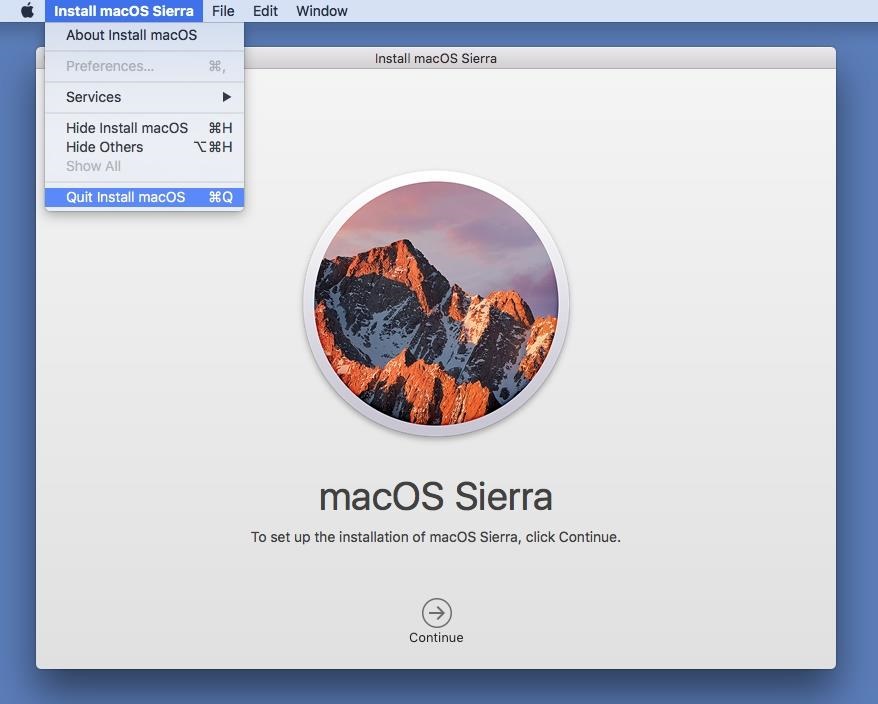
Download the macOS 10.12 Sierra from the Mac App Store (HERE) - but don't install it when it finishes downloading. If you do, it will auto-erase the file when your system gets back up and running, which means you won't have the file for your USB drive. So, close out any installation screen that pops up.


2. Get 'Install Disk Creator'
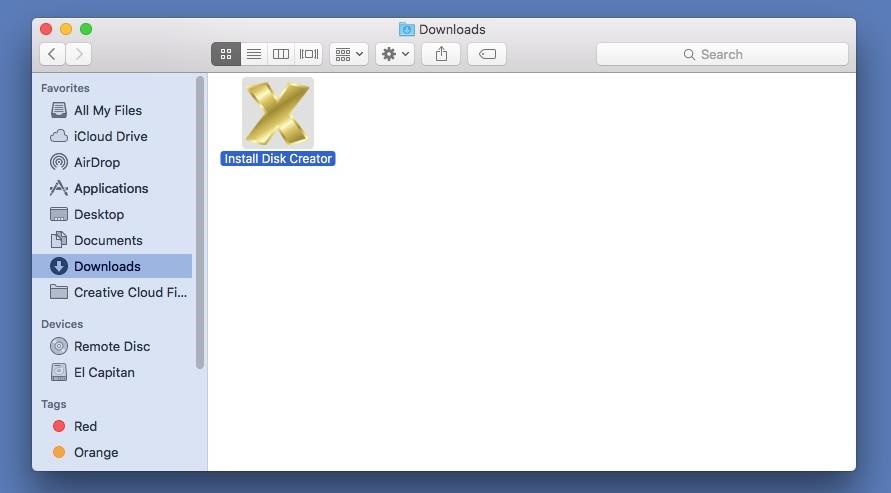
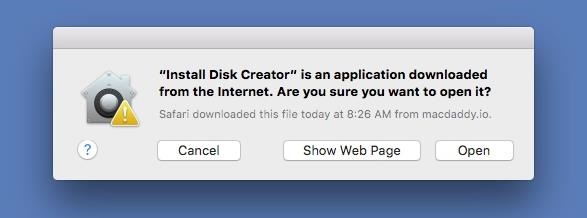
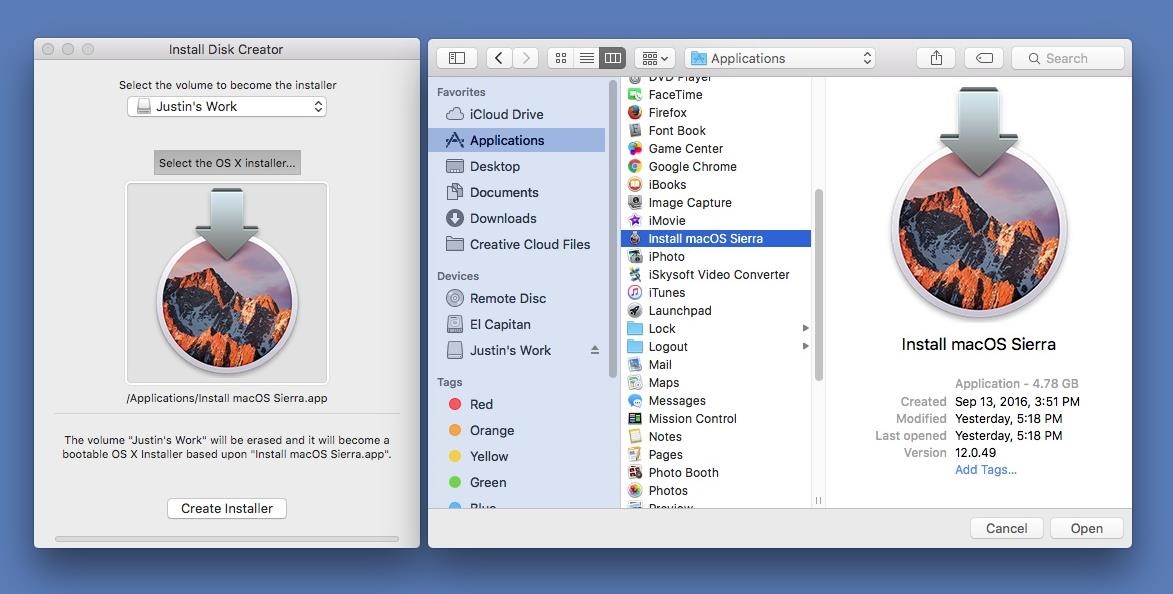
After downloading the app (HERE), unzip it, then open it up. When the popup appears, hit Open. (You may need to adjust your Gatekeeper security settings.)


3. Select Your USB Flash Drive
Use a USB flash drive with at least 16 GB of total space. It's possible an 8 GB one will work, but there have been issues with using 8 GB drives for more recent Mac installer files. The following process will totally wipe your USB flash drive, so make sure that you back up all of your important files, if any, before proceeding. When ready, select your flash drive in the drop-down menu in Install Disk Creator.


4. Choose Your Sierra File
Install Disk Creator will automatically detect your "OS X" installer file. If you have an old installer file from El Capitan or Yosemite installed, you might have to choose "Select the OS X installer" button, then navigate to your Applications folder and select "Install macOS Sierra."


5. Erase and Create the New Disk
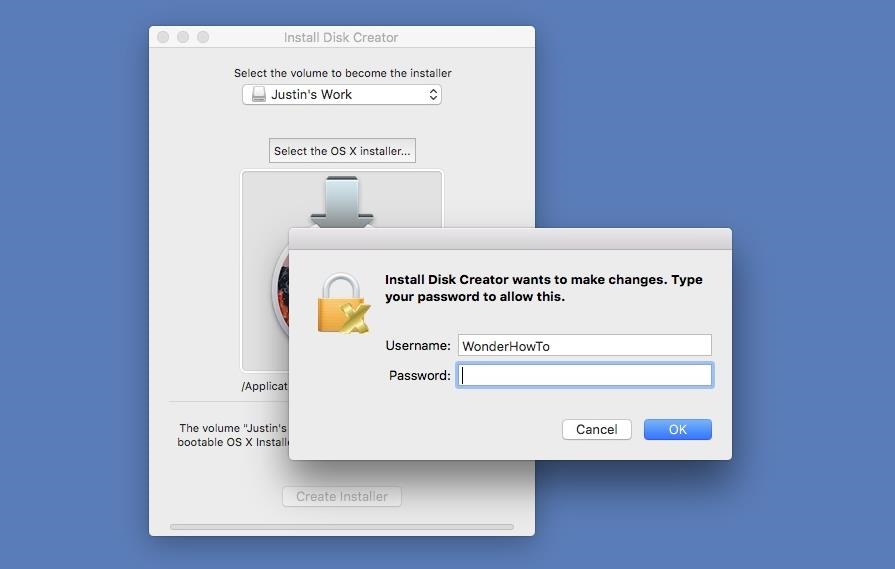
When ready, just hit the "Create Installer" button. You will need to enter your admin password to continue. As mentioned, this will erase your flash drive and turn it into a bootable macOS Sierra drive. So this is your last chance to stop and back up any important files on your flash drive before continuing. When the bootable drive is ready, you'll see a popup telling you so. The whole process takes about 6-7 minutes.


6. Install macOS Sierra on Your Computer
Now that you're all set, it's time to install Sierra on your computer. Most devices are supported, but just in case, check out the basic list of Macs you can install Sierra on below (for features requirements, see here). Also, you'll need OS X 10.75 or later, 2 GB of memory, and at least 8.8 GB of available storage to upgrade your computer.
  • MacBook (Late 2009 or newer)
  • MacBook Pro (Mid 2010 or newer)
  • MacBook Air (Late 2010 or newer)
  • Mac mini (Mid 2010 or newer)
  • iMac (Late 2009 or newer)
  • Mac Pro (Mid 2010 or newer)
With your bootable USB drive inserted in your computer, restart your Mac, then hold the Option (alt) key down on your keyboard until the Startup Manager appears. Select the macOS Sierra drive to continue. The macOS Utilities will open. Just select "Install macOS" from the list of options, then follow all of the on-screen prompts to start the installation process. After that, all you have to do is wait for it to boot back up with your new Sierra operating system!

Credit: gadgethacks.com

Apple Giving Up Your Phone, Tablet, Mac?

iOS 11 is on the way this fall. Apple says users can expect some big changes including more smart home uses, a complete redesign of the App Store and the largest update for an iPad that the company has ever done. iPads will also be getting a file manager system.

The company also says that Siri will be getting a more normal sounding voice and start using your Safari searches to make suggestions and also to correct your spelling.

But, as with all change, some things get left behind. In this case, it’s these devices:
  • iPad 4
  • iPhone 5
  • iPhone 5C

You could still use them, just not with the new OS. And if you can’t upgrade to the newest OS, you’re going to soon see the end of security and bug support for these systems.

You’ll need at least an iPad Air or and iPhone 5S to use iOS 11. Remember, support for 32-bit apps is ending soon as well. Thousands of apps won’t work with iOS 11.

There’s also a new operating system on the way for Macs called macOS High Sierra. The good news is that if you’re running macOS Sierra, you can run High Sierra.

Mac Pros, Mac minis, MacBook Airs, and MacBook Pros from 2010 or later can handle High Sierra, as can MacBooks, iMacs, and iMac Pros made in late 2009 or later.

Credit: worldstart.com

Apple Unveils All-new App Store

On Monday, June 5, Apple unveiled the all-new App Store, designed from the ground up to make discovering apps and games easier than ever before. The beautifully redesigned App Store is packed with original stories and editorial, updated daily in a new Today tab, as well as new Games and Apps tabs.

Compelling stories, in-depth interviews, helpful tips and collections of must-have apps and games will showcase Apple’s unique perspective and aim to inform, help and inspire customers every day.

App Store customers have now downloaded more than 180 billion apps and Apple has paid out over $70 billion to developers since the store launched in 2008, making it the most vibrant software marketplace in the world.

Read the complete news release > HERE.

New 10.5 inch iPad Pro

Yesterday Apple introduced an all-new 10.5-inch iPad Pro and a new 12.9-inch iPad Pro, featuring the world’s most advanced display with ProMotion technology and incredible performance with the new A10X Fusion chip.

The new 10.5-inch model reduces the borders by nearly 40 percent to fit into an incredibly compact package that still weighs just one pound. Combined with powerful new iPad features in iOS 11 coming this fall, like the all-new Files app, customizable Dock, improved multitasking and deeper integration of Apple Pencil, iPad Pro gives users the ability to be even more productive and creative. 

Read the complete news release > HERE.

Apple Previews iOS 11

Apple today previewed iOS 11, a major update to the world’s most advanced mobile operating system, bringing new experiences and hundreds of features to iPhone and iPad this fall. 

iOS 11 is the biggest software release ever for iPad, with powerful multitasking features, the Files app and more ways to use Apple Pencil. Augmented reality is coming to hundreds of millions of iOS devices with a new platform for developers to build apps that let users place virtual content on top of real-world scenes. 

Additional features include the ability to pay friends using Apple Pay, Do Not Disturb while driving to help users stay more focused on the road, even more intelligence and a new voice for Siri and new professional capabilities to Photos and Camera. 

iOS 11 is available as a developer preview today and will be a free software update for iPhone and iPad this fall. 

Read the complete news release > HERE.

My Favorite Mobile Apps

My phone and tablet have these 10 favorite apps. The App Store ratings, shown after the app name, are based on the 5 star system.

Calendarium (4-1/2 stars) by Idea Studio
Learn about today and discover interesting things in the past, too. You can easily move forward or backward from today and read through history. Each timeline item has links to various Wikipedia articles.

Daily App Advice (4-1/2 stars) by AppAdvice.com
Formally called Apps Gone Free, each day they show you a detailed list of the best apps that can be downloaded for free on that day. Their description will link you through to the App Store where you can read more and check the reviews before installing.

Google Earth (3-1/2 stars) by Google, Inc.
If you like maps and satellite views you'll love this app. Fly around the planet with a swipe of your finger. Zero in on your house in Oak Run. Explore distant lands or reacquaint yourself with your childhood home. Search for cities, places and businesses.

Gummy Drop! (4-3/4 stars) by Big Fish Games, Inc.
Way better than Candy Crush. A positively addictive match 3 game with thousands of levels across dozens of cities around the world. Excellent graphics. Warning: you won't want to stop playing!

Jigsaw Puzzle (4-1/2 stars) by Critical Hit Software, LLC
The most popular jigsaw puzzle app on the App Store. Numerous settings to customize it just right for you. Plenty of adjustments to make it more challenging. Daily free puzzles and sales on puzzle packs quite often.

Kindle (4-1/2 stars) by AMZN Mobile, LLC
A great way to read your purchased eBooks or the library books you've checked out. Lots of features to make your experience enjoyable. The dictionary is always helpful and font type and size is adjustable. Perfect for a tablet.

Radar HD (4-1/2 stars) by Elecont LLC
Both satellite and radar images are available in high resolution. Fully customizable with predictive (future) radar, too. Color coded precipitation, storm information and weather alerts. You can add place markers for your favorite locations.

Sky Live (5 stars) by Vito Technology, Inc.
A great app for planning star observations. Shows which planets, stars and constellation will be above the horizon, what the weather will be like, the visibility score and much more. Accurate hourly conditions are estimated using seven criteria.

Solitaire (4-1/2 stars) by MobilityWare
The original solitaire. Solve the Daily Challenge and receive a crown each day and a trophy for the month. The Winning Deals feature lets you adjust the percentage of games that are guaranteed to have at least one winning solution.

TV Guide Mobile (3-1/2 stars) by TV Guide
The ultimate TV companion. A great way to see what's on today and for the next week or so. Easy to adjust date, time and provider settings. Listing grid swipes in all directions. You can watch full episodes and get exclusive news.

25 Mac Tips and Tricks

There are many tips you’ll need in order to use your Mac more efficiently, regardless of your experience. Some of these will require recent versions of the Mac operating system (OS) such as the latest macOS Sierra – but not all of them do.

Review the 25 Mac Tips and Tricks on the Computer Club website > HERE.

Apple Reports Second Quarter Results

On May 2 Apple announced financial results for its fiscal 2017 second quarter ended April 1, 2017. The Company posted quarterly revenue of $52.9 billion and quarterly earnings per diluted share of $2.10. These results compare to revenue of $50.6 billion and earnings per diluted share of $1.90 in the year-ago quarter. International sales accounted for 65 percent of the quarter’s revenue.

“We are proud to report a strong March quarter, with revenue growth accelerating from the December quarter and continued robust demand for iPhone 7 Plus,” said Tim Cook, Apple’s CEO. “We’ve seen great customer response to both models of the new iPhone 7 (PRODUCT)RED Special Edition and we’re thrilled with the strong momentum of our Services business, with our highest revenue ever for a 13-week quarter.

Apple also announced that its Board of Directors has authorized an increase of $50 billion to the Company’s program to return capital to shareholders and is extending the program timeframe by four quarters. Under the expanded program, Apple plans to spend a cumulative total of $300 billion by the end of March 2019.

“We generated strong operating cash flow of $12.5 billion and returned over $10 billion to our investors in the March quarter,” said Luca Maestri, Apple’s CFO. “Given the strength of our business and our confidence in our future, we are happy to announce another $50 billion increase to our capital return program today.”

As part of the latest update to the program, the Board has increased its share repurchase authorization to $210 billion from the $175 billion level announced a year ago. The Company also expects to continue to net-share-settle vesting restricted stock units.

The Board has approved a 10.5% increase to the Company’s quarterly dividend, and has declared a dividend of $0.63 per share of the Company’s common stock, payable on May 18, 2017 to shareholders of record as of the close of business on May 15, 2017.

From the inception of its capital return program in August 2012 through March 2017, Apple has returned over $211 billion to shareholders, including $151 billion in share repurchases.

The Company plans to continue to access the domestic and international debt markets to assist in funding the program. The management team and the Board will continue to review each element of the capital return program regularly and plan to provide an update on the program on an annual basis.

Credit: apple.com

Mac Tips For Windows Switchers

For those of you who have switched from a Windows computer to a Mac, here are some tips to help you make the transition. Many keyboard shortcuts are similar except that instead of the Ctrl key you will use the Command (⌘) key.
  • Cut = command+X
  • Copy = command+C
  • Paste = command+V
  • Undo = command+Z
  • Print = command+P
  • Save = command+S
  • Select All = command+A
  • Close Window = command+W
  • Switch Apps = command+Tab
  • Quit App = command+Q
  • Find Files = command+space bar
  • Screenshot = shift+command+3
More Mac keyboard shortcuts can be found > HERE.

Here are some other tips for using your Mac.
  • Buttons for closing, minimizing, and maximizing a window are in the upper-left corner of the window.
  • Use the volume control in the menu bar, or use the volume keys on your Apple keyboard.
  • Use Spotlight to quickly find and open apps, documents, and other files.
  • You can also use Launchpad and the Dock to open your apps (programs).
  • Looking for Windows File Explorer? Learn about the Finder.
  • Looking for the Control Panel? Use System Preferences instead.
  • Looking for the Recycle Bin? Use the Trash, which is in the Dock.
  • To rename a file, click the file once to select it, then press the Return key and type a new name. Press Return when done.
  • Preview most files on your Mac using Quick Look. Click the file once to select it, then press Space bar.
  • Back-up files: Time Machine keeps a copy of all your files, and it remembers how your system looked on any given day.

Credit: apple.com

How To Use Safari 'Split Screen' Multitasking

Multi-app multitasking in iOS means two separate apps running side by side, with one new exception — Safari. With Safari in iOS 10, you can now run two views (split screen) from the same app, or more precisely, two tabs side by side.
Note: Safari Split View only works in landscape mode. They also only work in full screen. You can use Safari Split View in combination with Slide Over and Picture-in-Picture, but if you try to use multi-app Split View at the same time, the Safari Split View will automatically merge back down to one window, then return to split view when you close the second app.
How to create a Safari Split View

It's easy to put Safari into Split View at any time.
  1. Touch and hold the Tabs button at the top right.
  2. Tap on Open Split View.

If you're using a keyboard with your iPad, you can also use a keyboard shortcut.
  1. Type CMD+N.

How to open a link in Safari Split View

You can also open any link as a Safari Split View.
  1. Touch and hold on the link. (Long press.)
  2. Tap Open in Split View from the pop-up menu.

How to turn a tab into Safari Split View

If you have multiple tabs open already, you can make one of them into a Safari Split View.
  1. Touch and hold on the tab.
Drag the tab all the way to the right or left until it splits off into a new window.


How to switch a tab between Safari Split Views

Each split view can contain multiple tabs, and you can switch tabs between split views at any time.
  1. Touch and hold on the tab.
  2. Drag the tab to the opposite split view.

How to open links in the opposite Safari Views

You can also open links on the opposite side of your split view.
  1. Touch and hold on the link. (Long press.)
  2. Tap Open On Other Side from the pop-up menu.

How to merge Safari Split View back down to tabs

If you no longer want Safari Split View open, but you want to keep all your tabs, you can collapse everything back down.
  1. Touch and hold on the tab button. (It's moved to the bottom right.)
  2. Tap Merge All Tabs.

If you don't want to keep all your tabs, you can simply tab the close icon (looks like an X) to close them. When you've closed all the tabs in a split view, that side of the view will also close.

Credit: imore.com

How To Use 'Split View' Multitasking On iPad

Split view lets you keep two apps visible and active, side-by-side, at the same time. It's not full-on multi-window multitasking like the Mac, but it's twice what was possible previously with full-screen apps. It's a huge boost to productivity, and it's easy to use. (Only on iPad Air 2, iPad mini 4, iPad Pro and later.)

How to enter split view mode on your iPad

Before you can enter split view mode, you need to enter slide over mode. Once you're in slide over, you're only a tap away from split view.
  1. Touch one finger down on the bezel just past the right edge of your screen.
  2. Swipe your finger to the left to pull out the slide over sidebar.


  3. Tap the grabber on the left edge of the slide over sidebar to switch to split view.

The secondary app will pin down and the primary app will reactivate and resize to fit beside it.

How to resize the split view on iPad

In portrait orientation you only have one option for split view—60/40. In landscape orientation, however, you can switch from 70/30 to an even 50/50.
  1. Touch the grabber button at the left edge of the secondary app.
  2. Drag it the grabber to the left until it reaches the middle of the screen.
  3. Let go of the grabber.

You can't go to 30/70, but you can return to 70/30 by touch the grabber and dragging back.

How to switch the primary (left) app on iPad

To change the primary app—the app on the left—you use the typical iPad app-switching methods.
  1. Click the Home button to return to the Home screen and select another app
  2. Double-click the Home button to bring up the fast app switcher and select another app
  3. Use the four-finger gesture navigation to swipe back or forth between apps
  4. Tap on a link that opens another app.
Whatever the method, the newly launched app will replace the primary app—the left app—in the split screen setup.

How to switch the secondary (right) app on iPad

To change the secondary app—the app on the right—you use the same method as slide over mode.
  1. Touch one finger down on the gripper at the very top of the secondary app.
  2. Swipe down to bring down the app switcher.
  3. Swipe to scroll through the list of available apps.
  4. Tap on the app you want to use as the secondary app.

How to exit split view mode on iPad

You can exit split screen mode at any time by making either the primary or secondary app full-screen.
  1. Touch the grabber button at the left edge of the secondary app.
  2. Drag it the grabber all the way to the right to take the primary app full-screen.
  3. Or, drag the grabber all the way to the left to take the secondary app full-screen.
You can then pull a new app into slide over and tap it to return to split view whenever you want.

Credit: imore.com

How To Use 'Slide Over' Multitasking On iPad

With slide over on your iPad you can briefly access a secondary app to jot down a few notes, reply to a few messages, or check a few references, all without having to switch away from what you're doing in your primary app. (Only on iPad Air, iPad mini 2, and later.)

How to enter slide over mode on iPad

Entering slide over mode is as easy as bringing up notification center or control center, you just need to know where to swipe.
  1. Touch one finger down on the bezel just past the right edge of your screen.
  2. Swipe your finger to the left to pull out the slide over sidebar.

If you've never used slide over before, or if its been long enough since someone else used slide over that it doesn't have a recent app already loaded, you'll need to choose which app you want to fill the sidebar.
  1. Swipe down to scroll through the list of available apps. They're presented as tiles with app icons in the center.
  2. Tap on the app you want to use in slide over.

The primary (full screen) app you were using will dim and the slide over sidebar will overlay on top of it. You won't be able to use both apps at the same time — that's what split view is for — or use the primary app again until you dismiss the slide over.

How to switch the slide over app on iPad

Not all apps work in slide over; developers have to add support for it. If, like the vast majority of Apple's apps, the app you want to use does work in slide over, it's easy to switch to.
  1. Touch one finger down on the gripper at the very top of the slide over sidebar.
  2. Swipe down to bring back the app switcher.
  3. Swipe down to scroll through the list of available apps.
  4. Tap on the app you want to use in slide over.

How to exit slide over mode on iPad

Getting out of slide over mode is even easier than getting in.
  1. Touch one finger down on the slide over sidebar and swipe it away to the right.
  2. Or, tap anywhere outside the slide over sidebar and it'll swipe itself away.

Credit: imore.com

New iPad: Stunning Display, Performance

Apple today updated its most popular-sized iPad, featuring a brighter 9.7-inch Retina display and best-in-class performance at its most affordable price ever, starting at $329 (US). Designed for unmatched portability and ease of use, along with incredible performance and all-day battery life, iPad is the world’s most popular tablet and the primary computing device for millions of customers around the world.

Through the more than 1.3 million apps designed specifically for iPad, customers can do even more, from learning to code with Swift Playgrounds and reading books on the large screen to boosting productivity through Microsoft Office and using multitasking features like Split Screen.

iPad features a beautifully bright Retina display with over 3.1 million pixels for stunning pictures and videos, and is enclosed in a sturdy yet thin aluminum unibody enclosure weighing just one pound for great portability and durability. The Apple-designed A9 chip with 64‑bit desktop-class architecture delivers fast processing and graphics performance for apps and games, while maintaining the same all-day battery life customers have come to expect from iPad.

Read more > HERE
Credit: apple.com

Apple Reports Record First Quarter Results

Apple® today announced financial results for its fiscal 2017 first quarter ended December 31, 2016. The Company posted all-time record quarterly revenue of $78.4 billion and all-time record quarterly earnings per diluted share of $3.36. These results compare to revenue of $75.9 billion and earnings per diluted share of $3.28 in the year-ago quarter. International sales accounted for 64 percent of the quarter’s revenue.

“We’re thrilled to report that our holiday quarter results generated Apple’s highest quarterly revenue ever, and broke multiple records along the way. We sold more iPhones than ever before and set all-time revenue records for iPhone, Services, Mac and Apple Watch,” said Tim Cook, Apple’s CEO. “Revenue from Services grew strongly over last year, led by record customer activity on the App Store, and we are very excited about the products in our pipeline.”

“Our outstanding business performance resulted in a new all-time record for earnings per share, and over $27 billion in operating cash flow,” said Luca Maestri, Apple’s CFO. “We returned nearly $15 billion to investors through share repurchases and dividends during the quarter, bringing cumulative payments through our capital return program to over $200 billion.”

Apple is providing the following guidance for its fiscal 2017 second quarter:
  • revenue between $51.5 billion and $53.5 billion
  • gross margin between 38 percent and 39 percent
  • operating expenses between $6.5 billion and $6.6 billion
  • other income/(expense) of $400 million
  • tax rate of 26 percent

Apple’s board of directors has declared a cash dividend of $0.57 per share of the Company’s common stock. The dividend is payable on February 16, 2017 to shareholders of record as of the close of business on February 13, 2017.

Apple will provide live streaming of its Q1 2017 financial results conference call beginning at 2:00 p.m. PST on January 31, 2017 at apple/investor/earnings. This webcast will also be available for replay for approximately two weeks thereafter.

Credit: apple.com

App Store Starts Year With Busiest Day Ever

Apple® today announced that the App Store® welcomed 2017 with its busiest single day ever on New Year’s Day, capping a record-breaking holiday season and a year of unprecedented developer earnings and breakout app hits. In 2016 alone, developers earned over $20 billion, up over 40 percent from 2015.

Since the App Store launched in 2008, developers have earned over $60 billion, creating amazing app experiences for App Store customers across iPhone®, iPad®, Apple Watch®, Apple TV® and Mac®. Those efforts helped kick off 2017 with a remarkable start, making New Year’s Day the highest single day ever for the App Store with nearly $240 million in purchases.

Read the rest of the story > HERE.
For Your Information:
Posts are presented in a stack with the most recent post at the top. Clicking Older Posts will show the next (#) older posts and so forth. Clicking Newer Posts will show the previous (#) newer posts. Clicking on the word Home will display the top (#) most recent posts. When viewing a single post, clicking Older or Newer Post shows a single post each time, but, clicking Home displays the top (#) most recent posts. There are 326 posts in the stack, as of 9-15-19.